Top 7 Free Instagram Caption Generators to Boost Engagement in 2026

Introduction
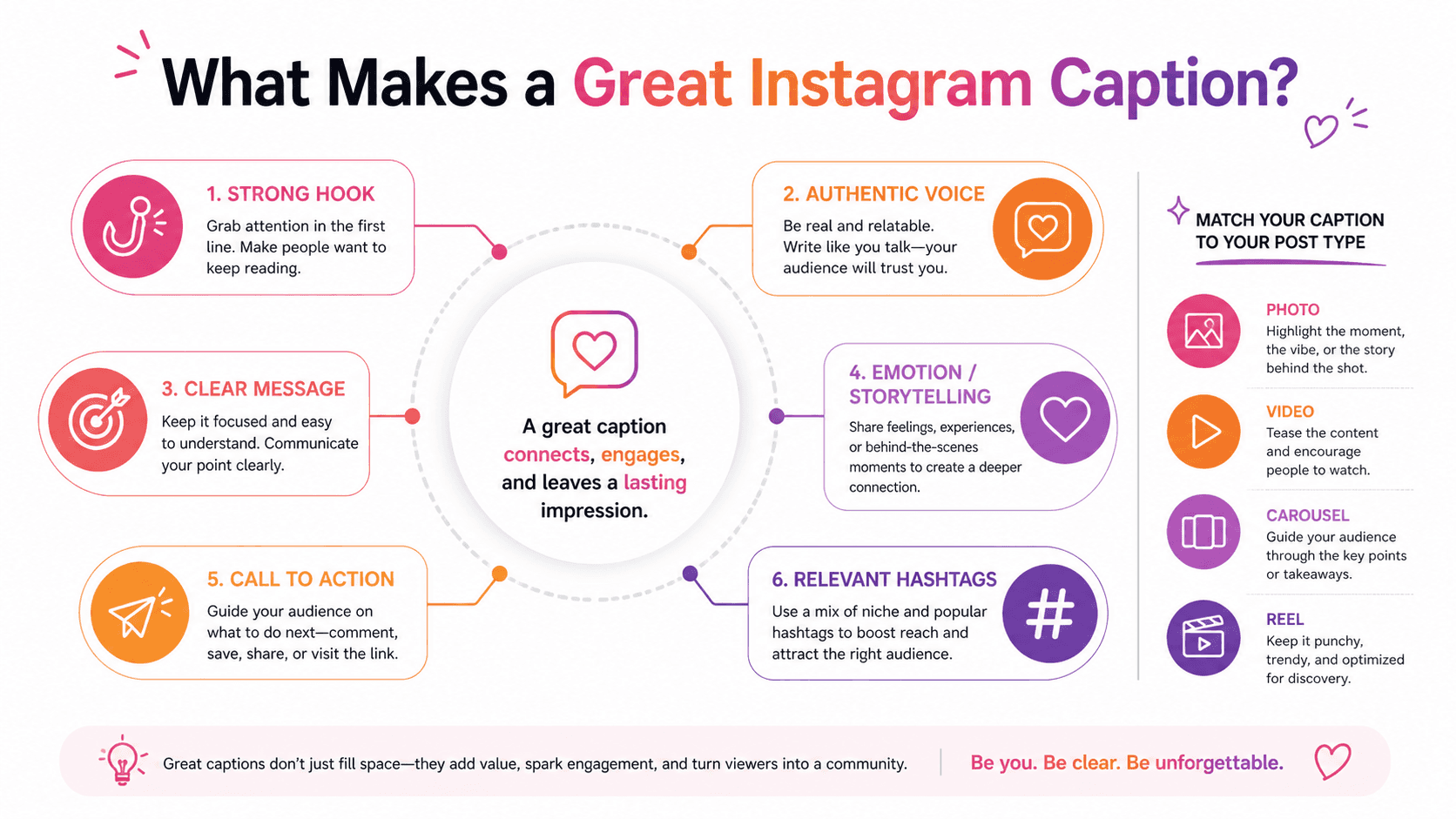
Crafting the perfect Instagram caption is both an art and a science. The right words can stop mid-scroll thumbs, spark conversations, drive sales, and build genuine connections with your audience. Yet staring at a blank caption box while your perfectly edited photo waits to be published is a frustration every content creator knows too well.

Instagram's algorithm increasingly prioritizes engagement, making captions more critical than ever. A compelling caption encourages comments, shares, and saves all signals that boost your content's reach. But producing creative, engaging captions daily while managing content creation, photography, and community engagement quickly becomes overwhelming.
Instagram caption generators have emerged as valuable tools for content creators, brands, and social media managers struggling with caption fatigue. These AI-powered assistants suggest engaging copy, relevant hashtags, and call-to-action phrases tailored to your content and audience.
This comprehensive guide examines the 7 best free Instagram caption generators available in 2026. You'll discover which tools excel at different content types, learn how to customize AI-generated captions to match your brand voice, and develop strategies for using these tools to maintain consistent, engaging content without sacrificing authenticity.
Understanding Instagram Caption Generators: How They Create Engaging Copy
Modern caption generators use artificial intelligence trained on millions of successful Instagram posts. These systems analyze what types of captions generate engagement across different niches, content types, and audience demographics.
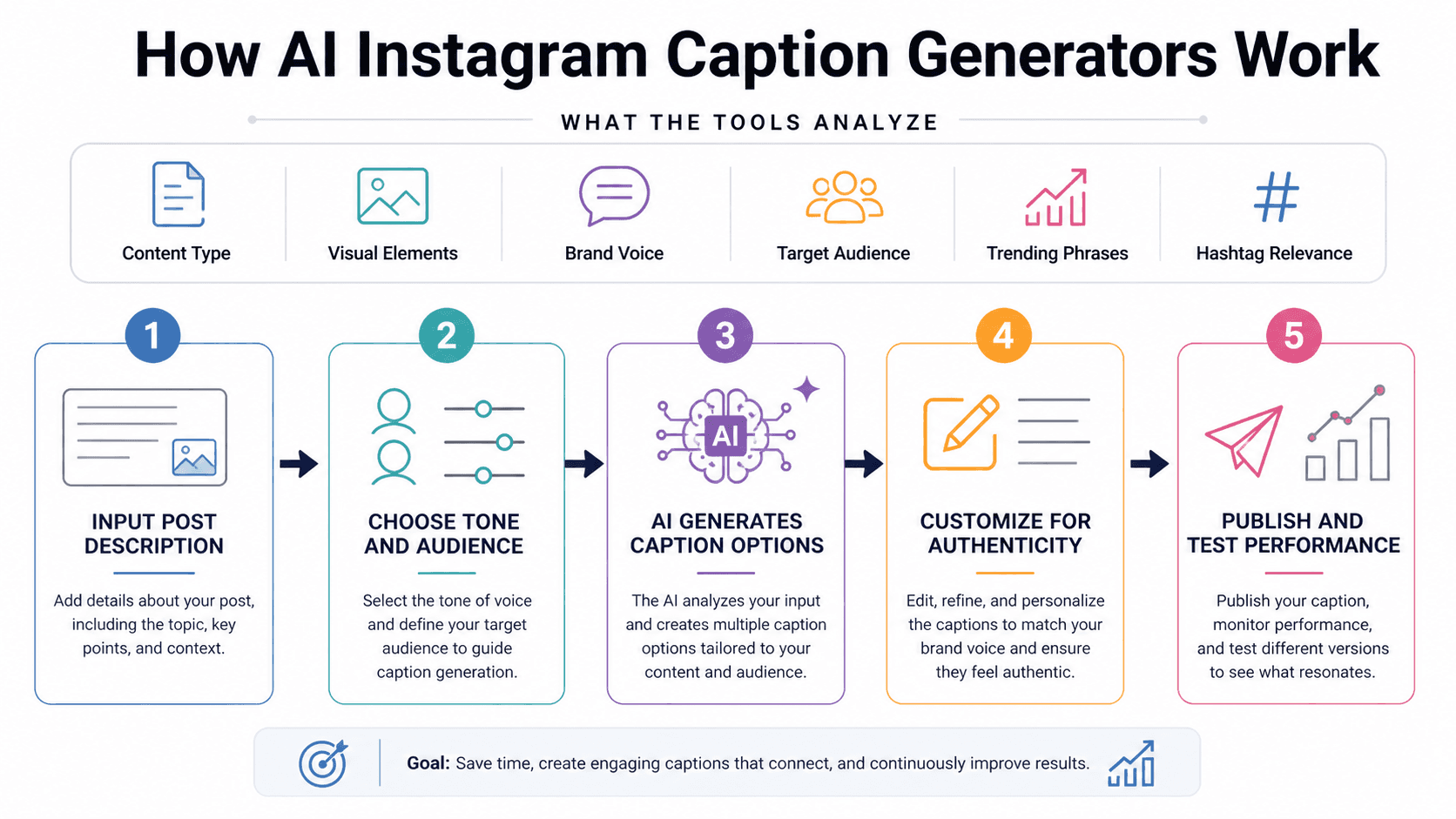
What Caption Generators Analyze:
Content type (photo, video, carousel, Reels)
Visual elements and subjects
Brand voice and tone preferences
Target audience characteristics
Trending phrases and formats
Hashtag performance and relevance
Advanced tools don't just generate random text they create captions strategically designed to encourage the specific types of engagement that boost algorithmic performance.
The best caption generators function as creative starting points rather than final products. They overcome writer's block and suggest directions you might not have considered, which you then refine to match your authentic voice.
1. Copy.ai: AI-Powered Social Media Captions
Copy.ai offers sophisticated Instagram caption generation within its broader AI writing platform. The free tier provides generous monthly credits sufficient for regular caption creation.
Key Features:
Multiple caption variations per prompt
Tone adjustment (professional, casual, witty, inspirational)
Emoji integration suggestions
Call-to-action recommendations
Hashtag suggestions based on content
Enter a brief description of your post, specify your desired tone, and Copy.ai generates 5-10 caption variations. The range lets you choose approaches that best match your content and brand personality.
The tool particularly excels at creating captions for specific marketing objectives product launches, promotions, storytelling, or community building. You can specify the goal, and captions adapt accordingly.
Best Used For: Brand accounts requiring professional, strategic captions with specific marketing objectives.
2. Jasper AI Instagram Caption Template: Professional Quality
Jasper AI includes Instagram-specific caption templates that generate engaging copy based on proven frameworks. The free trial provides access to professional-quality caption generation.
What Jasper Offers:
Framework-based caption generation
Brand voice customization
Multiple output variations
Integration with visual content descriptions
Audience targeting options
Jasper's strength lies in maintaining consistent brand voice across captions. You can define your brand's personality once, and all generated captions reflect that established voice.
The tool analyzes your input about the visual content and generates captions that complement rather than simply describe what's visible adding context, emotion, or calls to action.
Best Used For: Established brands maintaining consistent voice across professional Instagram presence.
3. Writesonic Instagram Caption Generator: Fast and Free
Writesonic provides unlimited Instagram caption generation in its free tier with daily credit limits that reset every 24 hours.
Core Capabilities:
Unlimited daily captions within credit limit
Multiple tone options
Hashtag generation
Emoji suggestions
Quick generation speed
The speed is particularly notable generate multiple caption variations in seconds, perfect when you need to post quickly or batch-create captions for scheduled content.
Writesonic works well for creators who post frequently and need consistent caption quality without overthinking each post. The tool maintains a balance between creativity and reliability.
Best Used For: High-volume content creators needing fast, reliable caption generation daily.
4. Rytr: Budget-Friendly with Instagram Focus
Rytr offers one of the most generous free tiers among AI writing tools, including specific Instagram caption creation capabilities.
Free Features:
10,000 characters per month free
40+ use cases including Instagram captions
30+ language support
Tone and creativity level control
Built-in plagiarism checker
The tone control slider is particularly useful, letting you adjust from formal to casual across a spectrum rather than choosing preset options. This granular control helps match your specific brand personality.
Rytr also generates caption ideas based on trending formats questions, fill-in-the-blanks, controversial statements, storytelling hooks keeping your content fresh and varied.
Best Used For: Individual creators and small businesses wanting flexible, customizable caption generation.
5. ChatGPT: Conversational Caption Creation
ChatGPT, while not Instagram-specific, excels at generating engaging captions through conversational prompting. The free tier provides extensive access for caption creation.
How to Use ChatGPT Effectively:
Describe your image and target audience
Specify desired caption style and length
Request multiple variations
Ask for hashtag suggestions
Refine based on initial outputs
The conversational interface lets you iterate quickly. If the first caption isn't quite right, ask ChatGPT to adjust tone, add humor, include questions, or emphasize different aspects.
You can also paste high-performing previous captions and ask ChatGPT to generate similar styles, maintaining consistency with what already works for your audience.
Best Used For: Creators comfortable with prompting who want maximum customization and control.
6. Simplified: All-in-One Social Media Tool
Simplified combines Instagram caption generation with visual content creation, scheduling, and analytics in one platform. The free tier includes caption AI alongside other tools.
Integrated Features:
AI caption writer
Visual content creation tools
Hashtag generator
Posting scheduler
Analytics dashboard
For creators managing the entire Instagram workflow, having caption generation integrated with content creation and scheduling streamlines processes significantly. Create graphics, generate captions, and schedule posts without switching platforms.
The caption generator analyzes your visual content directly if created within Simplified, generating copy that references specific elements in your design.
Best Used For: Creators wanting integrated content creation, caption generation, and scheduling in one tool.
7. Predis.ai: AI Social Media Captions
Predis.ai specializes in social media content generation with particularly strong Instagram caption capabilities. The free tier offers limited monthly caption generation.
Specialized Features:
Industry-specific caption templates
Trend-based caption suggestions
Engagement prediction scoring
Hashtag performance analysis
Multi-platform caption adaptation
What distinguishes Predis.ai is the engagement prediction feature. The AI scores each generated caption based on likely performance, helping you choose the version most likely to drive comments, shares, and saves.
The tool also adapts captions for different platforms. Generate an Instagram caption, and Predis.ai can automatically create Twitter, Facebook, and LinkedIn variations maintaining your message across channels.
Best Used For: Multi-platform social media management with Instagram as a primary channel.
Crafting Effective Prompts for Better Captions
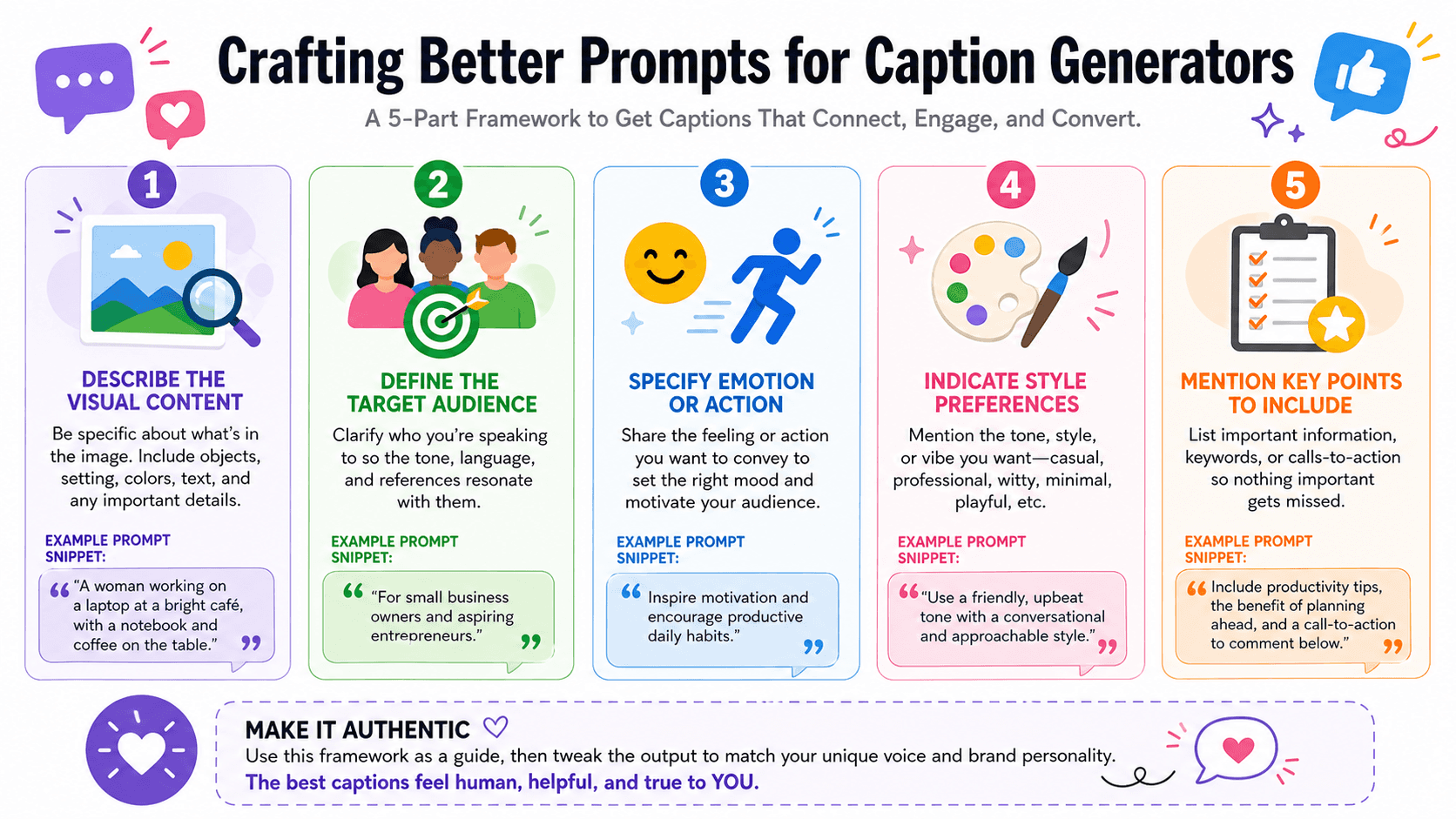
Caption generator quality depends heavily on input quality. Effective prompting produces significantly better results than vague descriptions.
Elements of Strong Prompts:
Describe visual content specifically. Instead of "coffee photo," try "close-up of latte art in white ceramic cup on rustic wooden table with morning sunlight."
Define your target audience. "Young professionals interested in productivity" generates different captions than "coffee enthusiasts who appreciate artisanal brewing."
Specify desired emotion or action. "Make them crave their morning coffee" or "Encourage comments about their coffee ritual" guides tone and structure.
Indicate caption style preferences. "Conversational and friendly," "Motivational and inspiring," or "Funny and self-deprecating" produces distinctly different results.
Mention key points to include. "Mention our new oat milk option and ask followers about dairy alternatives" ensures important information appears.
Customizing AI Captions to Sound Authentic
The biggest mistake creators make is using AI-generated captions verbatim without personalization. Authenticity requires customization.
Customization Strategies:
Add personal anecdotes. AI can't share your experiences. Insert brief personal stories that connect the content to your life or brand story.
Include specific details. Replace generic phrases with specific names, locations, products, or situations relevant to your audience.
Adjust vocabulary to match your voice. If you'd never use certain words or phrases, replace them with terms natural to your speaking style.
Remove obviously AI phrases. Certain transitional phrases and structures signal AI writing. Edit these into more natural, conversational language.
Add questions your audience actually asks. Generic questions feel templated. Ask specific questions your community discusses in comments or DMs.
Hashtag Strategy with Caption Generators
Most caption generators include hashtag suggestions, but effective hashtag strategy requires understanding beyond AI recommendations.
Smart Hashtag Practices:
Combine sizes strategically. Use a mix of high-volume hashtags (100k-1M posts), medium-volume (10k-100k), and niche-specific tags (under 10k) to balance reach and relevance.
Verify hashtag relevance. AI might suggest trending hashtags that don't actually fit your content. Always check before including.
Rotate hashtags regularly. Using identical hashtag sets on every post can appear spammy. Generate fresh variations for each caption.
Research niche-specific tags. AI might miss highly relevant niche hashtags your specific audience uses. Supplement AI suggestions with manual research.
Place hashtags strategically. Test whether your audience responds better to hashtags integrated into captions or in first comments.
Balancing Automation and Authenticity
Caption generators should enhance rather than replace your authentic voice. Finding this balance maintains genuine connection with your audience.
Maintaining Authenticity:
Use generators for structure, not complete content. Take the framework, hook, or CTA from AI, then fill in with your personality and expertise.
Share real experiences. No AI can replicate your unique perspective, stories, or insights. These authentic elements must come from you.
Engage genuinely in comments. If your caption asks questions, respond personally to comments rather than using templated replies.
Let imperfections show. Overly polished, perfect captions every time feel inauthentic. Occasional typos, casual grammar, and imperfect phrasing signal real human presence.
Vary your approach. Don't rely solely on AI captions. Mix generated content with purely original captions to maintain variety and authenticity.
Measuring Caption Performance
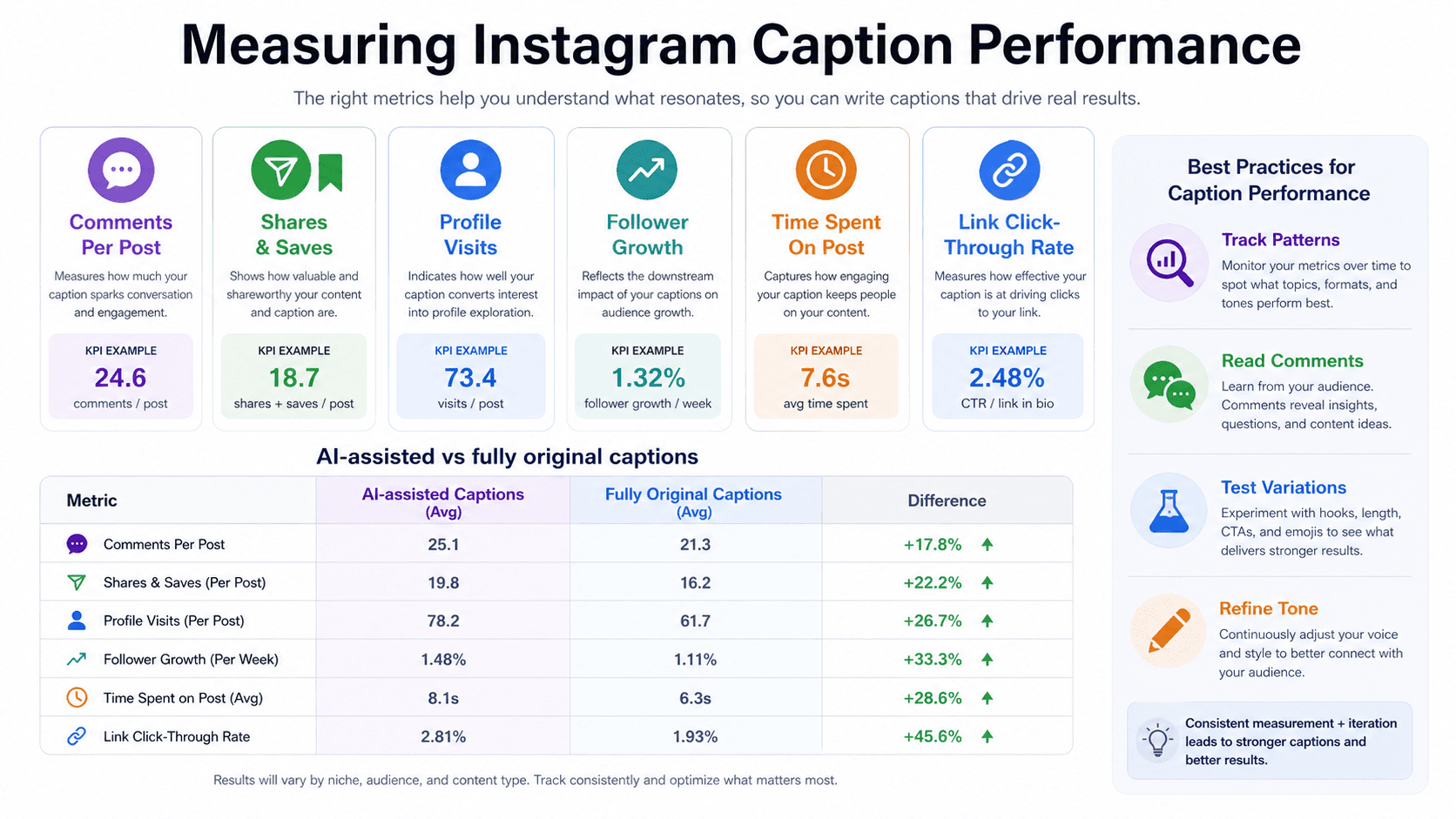
The best way to improve caption effectiveness is tracking what works for your specific audience.
Metrics to Monitor:
Comments per post
Shares and saves
Profile visits from posts
Follower growth rate
Time spent on post
Click-through on links
Compare these metrics between AI-generated captions (even customized ones) and fully original captions. This data reveals whether generators actually improve performance or if your audience prefers completely original content.
Most importantly, read the comments. Qualitative feedback often reveals more than quantitative metrics about whether captions resonate emotionally and drive meaningful engagement.

Frequently Asked Questions
Are AI-generated Instagram captions detectable by users? Heavily AI-generated captions often feel generic or overly polished, which savvy users may notice. However, AI captions customized with personal details, specific examples, and authentic voice are indistinguishable from manually written content.
Can caption generators help smaller accounts grow faster? Caption generators help maintain consistent quality, which is important for growth, but they're just one factor. Visual content quality, posting consistency, engagement with other accounts, and niche relevance matter equally or more for growth.
How often should I use caption generators versus writing my own? There's no universal rule. Some creators use generators for 80% of captions, heavily customizing each one. Others use them only when experiencing writer's block. Experiment to find what maintains both efficiency and authenticity for your brand.
Do caption generators work for niche industries or products? General caption generators may struggle with highly technical or niche content. Success depends on how well you prompt the AI with specific industry terminology and context. Niche accounts often need more manual customization than general lifestyle content.
Can using the same caption generator as competitors hurt my uniqueness? Only if you use generated captions without customization. The same tool given different prompts and heavily edited produces distinctly different results. Focus on developing your unique voice rather than worrying about tool overlap.
Should I disclose when using AI for caption creation? Current Instagram guidelines don't require disclosure for AI-assisted captions. However, community norms vary by niche. Some audiences expect transparency about AI use, while others don't consider caption assistance noteworthy. Consider your specific community's values.
Conclusion
Instagram caption generators represent practical tools for content creators facing the daily challenge of producing engaging copy across multiple posts. They overcome writer's block, suggest creative approaches, and maintain consistency when inspiration runs low.
Among free options, Copy.ai and Writesonic offer the best balance of quality and accessibility for most creators. ChatGPT provides maximum flexibility for those comfortable with prompting, while Simplified suits creators wanting integrated content creation workflows.
The key to using caption generators effectively is viewing them as creative assistants rather than replacement writers. They provide structure, suggestions, and starting points that you refine with authentic stories, specific details, and genuine personality.
Your captions should reflect your unique voice, experiences, and relationship with your audience elements no AI can replicate. Generators help you express those authentic elements more consistently and creatively, but they can't create them from nothing.
Start experimenting with one tool from this list. Generate multiple variations for your next several posts, heavily customize them, and track performance metrics. This data-driven approach reveals whether caption generators improve your engagement and efficiency or if your audience connects more with purely original content.
Instagram success ultimately depends on genuine connection with your community. Whether you write every word manually or use AI assistance, that connection built through authenticity, value, and consistent engagement remains irreplaceable and must guide every caption you publish.


