Top 10 Free Paraphrasing Tools to Rewrite Content Like a Pro in 2026
Introduction

Content creators, students, and professionals constantly face the challenge of expressing ideas in fresh, original ways. Whether you're avoiding plagiarism in academic work, creating multiple versions of marketing copy, or simply trying to improve clarity, paraphrasing tools have become essential writing assistants.
The right text rewriter can save hours of manual editing while maintaining or even improving your message's clarity and impact. But with dozens of paraphrase generators available, how do you choose the most effective option without spending money on premium subscriptions?
This comprehensive guide examines the 10 best free paraphrasing tools available in 2026. You'll discover which tools excel at academic writing, which are best for creative content, and which offer the most advanced AI-powered rewording capabilities. More importantly, you'll learn how to use these sentence rephrasers effectively to produce original, high-quality content that sounds natural rather than machine-generated.
Understanding Paraphrasing Tools: How They Work
Modern paraphrasing tools use artificial intelligence and natural language processing to understand context, meaning, and intent before rewriting text. Unlike simple synonym replacers that create awkward, unreadable content, advanced AI paraphrasers analyze sentence structure, maintain logical flow, and preserve your original message.
The Technology Behind Paraphrasing:
Natural Language Processing (NLP) breaks down sentence structure
Machine learning models trained on billions of text examples
Context-aware algorithms that understand meaning beyond individual words
Synonym databases that select appropriate word replacements
Grammar checking integrated into the rewriting process
Quality paraphrasing tools offer multiple modes from light rewording that preserves most original phrasing to complete restructuring that creates entirely new sentences with the same meaning.
1. QuillBot: The Industry Standard for Free Paraphrasing
QuillBot has established itself as the benchmark for free paraphrasing tools, offering sophisticated AI-powered rewriting with a generous free tier. The platform processes up to 125 words at once and provides multiple writing modes to match different needs.
Free Features Include:
Standard and Fluency modes
Word-by-word synonym suggestions
Grammar checking integration
Browser extension for Chrome and Word
Summarizer tool (up to 1,200 words)
The Fluency mode is particularly effective, creating natural-sounding text that avoids the robotic tone common in automated rewrites. You can freeze specific words or phrases you want preserved, giving you control over the final output.
QuillBot excels at academic writing where maintaining formal tone while avoiding plagiarism is critical. The tool restructures sentences intelligently rather than just swapping synonyms, resulting in genuinely original phrasing.
Best Used For: Academic writing, professional documents, and content requiring formal tone preservation.
Paraphraser.io: Simple, Fast, and Accurate
Paraphraser.io is a dedicated AI-powered paraphrasing tool designed to help users rephrase content while preserving its original meaning. Its straightforward interface and multiple modes make it suitable for students, bloggers, marketers, and professionals who need quick yet reliable content transformation.
The free version allows users to paraphrase text with minimal setup and offers several writing styles to suit different purposes.
Free Features Include:
Multiple paraphrasing modes
AI-powered sentence restructuring
Built-in grammar improvement
Support for multiple languages
Simple copy, paste, and rephrase workflow
No software installation required
For users who frequently repurpose blog posts, website content, academic material, or business documents, Paraphraser.io provides a fast and practical way to create unique versions without sacrificing clarity or readability.
Best Used For: Rephrasing blog posts, academic content, website copy, marketing materials, and everyday writing that requires natural, plagiarism-free rewording.
3. Grammarly's Paraphrasing Feature: Quality Within a Larger Platform

While primarily known as a grammar checker, Grammarly includes paraphrasing capabilities that leverage its sophisticated language understanding. The free version offers limited paraphrasing suggestions as you write, making it more of an integrated writing assistant than a dedicated rewriting tool.
Grammarly analyzes your writing in real-time and suggests alternative phrasings that improve clarity, conciseness, or engagement. These aren't full paragraph rewrites but targeted improvements that accumulate into significantly enhanced writing.
What Sets Grammarly Apart:
Context-aware suggestions that understand your document's purpose
Tone adjustments for different audiences
Real-time feedback as you write
Browser extension works across all web platforms
Integration with Word, Google Docs, and email
For writers who want continuous improvement rather than bulk rewriting, Grammarly's approach offers tremendous value. The suggestions help you develop better writing habits rather than just fixing existing text.
Best Used For: Improving writing quality during the creation process rather than rewriting finished content.
4. Wordtune: AI-Powered Sentence Refinement
Wordtune takes a unique approach to paraphrasing, offering multiple alternative phrasings for each sentence. Rather than automatically rewriting entire paragraphs, you select sentences and receive 5-10 variations to choose from.
This interactive approach gives you more control over the final output while still saving significant time compared to manual rewriting. The free version provides 10 rewrites per day limited but sufficient for focused editing sessions.
Wordtune's Strengths:
Multiple alternatives for every sentence
Casual and formal tone options
Shorten or expand functionality
Browser extension for seamless integration
Maintains original meaning exceptionally well
The tool particularly excels when you know something sounds awkward but can't figure out how to fix it. Seeing multiple alternatives often triggers the perfect phrasing you couldn't articulate yourself.
Best Used For: Polishing specific sentences and paragraphs to professional quality.
5. Rephrase.info: Multilingual Paraphrasing Power
Rephrase.info supports paraphrasing in over 100 languages, making it invaluable for international content creators and multilingual writers. The free tier offers unlimited paraphrasing with no registration required.
Language Capabilities:
All major European languages
Asian languages including Chinese, Japanese, Korean
Middle Eastern languages including Arabic and Hebrew
Regional language variations
The quality varies by language English paraphrasing is excellent, while less common languages may produce simpler rewrites. However, for non-English content creation, few free alternatives offer comparable functionality.
The tool provides three rewriting modes: fluency, standard, and creative. Each produces different levels of transformation, from light editing to complete restructuring.
Best Used For: Multilingual content creation and paraphrasing non-English text.
6. Spinbot: Quick Automated Rewriting
Spinbot offers instant, unlimited paraphrasing with zero restrictions. The trade-off is less sophisticated rewrites compared to AI-powered alternatives, but for quick content variation, it serves its purpose.
This article spinner works best when you need multiple versions of similar content quickly think product descriptions, meta descriptions, or social media posts where slight variations prevent repetition.
How to Use Spinbot Effectively:
Start with well-written original content
Review and manually edit the output
Use for short-form content rather than long articles
Combine with manual editing for best results
Spinbot won't replace skilled writing, but it provides a solid foundation for creating content variations that you can refine. The key is treating it as a starting point rather than a finished product.
Best Used For: Creating multiple variations of short-form content quickly.
7. Smodin: Multi-Tool Writing Platform with Paraphrasing
Smodin combines paraphrasing with citation generation, plagiarism checking, and text summarization in one free platform. This integrated approach makes it particularly valuable for academic writing and research.
The paraphrasing tool supports over 50 languages and offers unlimited free usage with character limits per request. You can paraphrase up to 1,000 characters at a time, sufficient for most paragraph-length content.
Integrated Features:
Paraphrasing engine with multiple modes
Citation generator for academic sources
Plagiarism detection (limited free checks)
AI-powered writing assistance
Text summarizer
For students and researchers, having multiple writing tools in one platform streamlines workflow significantly. You can paraphrase, check for plagiarism, and generate citations without switching between services.
Best Used For: Academic writing and research projects requiring multiple writing assistance tools.
8. Paraphraser.io: Clean Interface, Solid Results
Paraphraser.io delivers reliable paraphrasing through a clean, distraction-free interface. The free version allows unlimited paraphrasing with a 600-word limit per request generous enough for most paragraphs and short sections.
Notable Features:
Four rewriting modes (creative, smart, fluency, formal)
Multilingual support
File upload capability (docx, txt, pdf)
Chrome extension
No registration required
The creative mode produces the most extensive rewrites, essentially recreating your content with entirely different sentence structures. The formal mode maintains professional tone while the fluency mode optimizes for readability.
You can upload documents directly rather than copy-pasting, which is convenient when paraphrasing longer works in sections. The tool processes files and maintains basic formatting in the output.
Best Used For: Paraphrasing documents and longer content sections with various tone requirements.
9. Prepostseo Paraphrasing Tool: SEO-Focused Rewriting
Prepostseo's paraphrasing tool specifically targets content creators focused on SEO and avoiding duplicate content penalties. The free version offers multiple rewrites per day and includes plagiarism checking to verify originality.
SEO-Specific Features:
Multiple rewriting modes optimized for web content
Built-in plagiarism checker
Readability scoring
Word count and character count
Downloadable output
The tool understands that SEO content requires maintaining keyword presence while varying surrounding language. You can specify keywords to preserve while paraphrasing the rest of your content essential for maintaining search optimization.
For bloggers and content marketers, this focus on SEO makes Prepostseo particularly valuable. The paraphrasing doesn't just create unique content; it creates unique content that maintains search engine value.
Best Used For: SEO content creation and avoiding duplicate content issues while maintaining keyword optimization.
10. Editpad Paraphraser: Fast Batch Processing
Editpad offers straightforward paraphrasing with the advantage of batch processing. You can paraphrase multiple paragraphs or sections individually, reviewing and accepting each before moving to the next.
Practical Features:
Up to 500 words per paraphrase
Multiple paraphrasing modes
Side-by-side comparison view
One-click copying
Mobile optimization
The side-by-side view is particularly useful, letting you compare original and paraphrased text instantly. This makes it easier to verify that meaning has been preserved and quality meets your standards.
Editpad works well for editing workflows where you're improving existing content section by section. The interface supports focused work on individual paragraphs rather than overwhelming you with entire articles rewritten at once.
Best Used For: Systematic paragraph-by-paragraph content improvement and editing workflows.
How to Use Paraphrasing Tools Effectively
Simply pasting text into a paraphrase generator and accepting the output rarely produces optimal results. Strategic use requires understanding these tools' strengths and limitations.
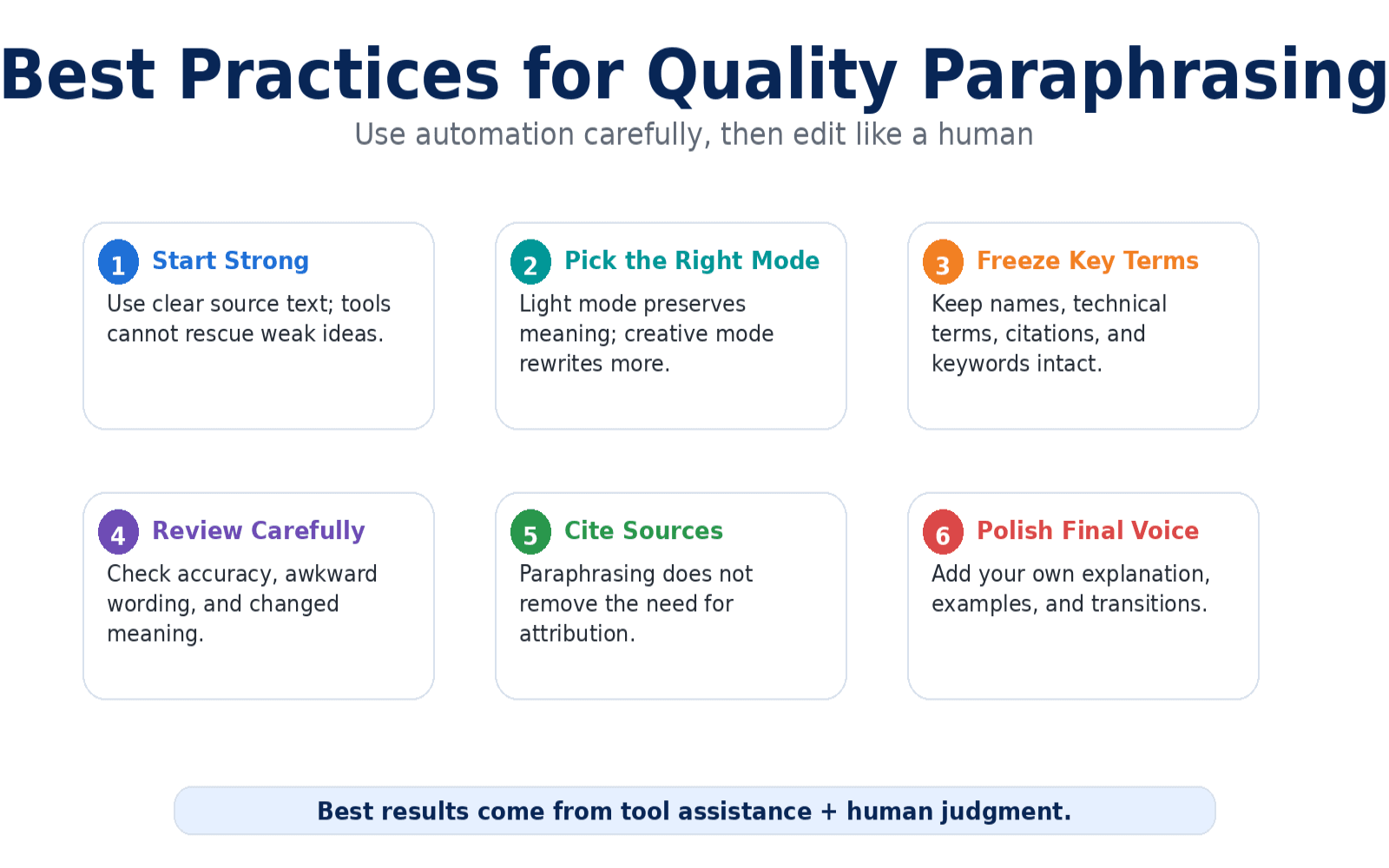
Best Practices for Quality Paraphrasing:
Start with strong original content. Paraphrasing tools improve and restate ideas but can't transform poorly-written source material into excellent content. Your original text should be clear, logical, and well-structured.
Choose the appropriate rewriting mode. Light paraphrasing preserves more original structure and is faster but less unique. Heavy paraphrasing creates more original text but requires more careful review.
Always review and edit output. No AI paraphraser is perfect. Read through rewritten content to ensure accuracy, natural flow, and preserved meaning. Fix awkward phrasings and verify technical terms remain correct.
Combine tools for best results. Use one tool for initial paraphrasing, then run the output through Grammarly or another grammar checker to catch any errors introduced during rewriting.
Preserve key terminology. Most tools allow you to freeze specific words or phrases. Use this feature for proper nouns, technical terms, brand names, and keywords that must remain unchanged.
Avoiding Common Paraphrasing Mistakes
Over-reliance on automation: Paraphrasing tools assist writing but shouldn't replace original thinking. The best content combines automated assistance with human creativity and expertise.
Ignoring context changes: Sometimes replacing a word with its synonym changes meaning subtly. "Investigate the issue" versus "research the issue" have different connotations depending on context.
Forgetting to cite sources: Paraphrasing doesn't eliminate the need for citations in academic work. Even heavily reworded ideas from other sources require proper attribution.
Accepting awkward phrasing: If paraphrased text sounds unnatural, it probably is. Trust your instincts and manually refine sections that don't flow smoothly.
Paraphrasing unique voices: In creative writing or when quoting experts, sometimes the original phrasing is irreplaceable. Know when to preserve distinctive language rather than rewriting everything.
Legal and Ethical Considerations

Understanding plagiarism versus paraphrasing is crucial, especially for students and professional writers.
What Constitutes Plagiarism:
Using paraphrasing tools on others' content without citation
Slightly rewording copyrighted material and claiming it as original
Paraphrasing distinctive ideas without attribution
Using tools to avoid plagiarism detection rather than prevent actual plagiarism
Ethical Paraphrasing:
Rewriting your own previously published content
Creating variations of marketing copy you created
Improving clarity and readability of your original drafts
Adapting content for different audiences while maintaining attribution
Academic institutions increasingly use sophisticated plagiarism detection software that can identify paraphrased content. The goal should be understanding and expressing ideas in your own words, with paraphrasing tools serving as editing assistants rather than shortcuts to originality.
Frequently Asked Questions
Are free paraphrasing tools as good as paid versions? Free paraphrasing tools offer impressive capabilities, though paid versions typically provide unlimited usage, more rewriting modes, and advanced features like tone adjustment. For occasional use, free tools are often sufficient; high-volume professional use may justify premium subscriptions.
Can paraphrasing tools detect and avoid plagiarism? Paraphrasing tools rewrite text to create original phrasing, but they don't automatically check for plagiarism. You should use a dedicated plagiarism checker to verify uniqueness, especially for academic or professional work where originality is critical.
Is it cheating to use paraphrasing tools for academic writing? Using paraphrasing tools to reword your own ideas or improve your original writing is generally acceptable. Using them to disguise plagiarism or avoid understanding source material is academic dishonesty. Always check your institution's specific policies.
How do I choose the best free paraphrasing tool for my needs? Consider your primary use case: QuillBot excels at academic writing, Paraphrase.io handles high-volume needs, Grammarly integrates with your writing process, and Prepostseo focuses on SEO content. Try several tools to find which produces results closest to your natural writing style.
Can paraphrasing tools rewrite content in languages other than English? Yes, tools like Rephrase.info and Smodin support dozens of languages. However, quality varies significantly major languages like Spanish, French, and German receive better support than less common languages.
Will Google penalize my website for using paraphrased content? Google doesn't penalize properly paraphrased original content. However, heavily paraphrasing others' work to create "unique" content without adding value can harm your rankings. Focus on creating genuinely valuable content rather than just avoiding duplicate content detection.
Conclusion
Free paraphrasing tools have evolved from simple synonym replacers into sophisticated AI assistants that genuinely improve writing efficiency and quality. Whether you're a student avoiding plagiarism, a content creator producing variations of marketing copy, or a professional polishing communications, these tools offer substantial value without subscription costs.
QuillBot, Paraphrase.io, and Grammarly represent the top tier of free options, each excelling in different scenarios. Supplementary tools like Wordtune, Smodin, and Prepostseo add specialized capabilities for specific use cases.
The key to effective paraphrasing is treating these tools as assistants rather than replacements for critical thinking and original expression. Use them to improve clarity, create variations, and refine phrasing but always review output, verify accuracy, and ensure the final content represents your authentic voice and ideas.
Start with one tool from this list, learn its strengths, and integrate it into your writing workflow. As you become comfortable with AI-assisted paraphrasing, you'll find these tools don't replace the writing process but rather enhance it, allowing you to express ideas more clearly and efficiently than ever before.